M3- Order and Proportion Design Assignment
Purpose:
In this exercise you will modify your model from assignment M2 based on the feedback you received. You will apply your knowledge to make changes in your model to demonstrate one of the following organizational strategies; centralized, linear, radial, clustered, or grid. You will also consider other key elements discussed in the reading and lecture as, spatial relationships, circulation elements and ordering principles. The changes to your model will reflect a scale that makes sense for a person to interact with it. This assignment will give you practice integrating design principles, developing your digital modeling and hand sketching skills and presenting your work.
Resources:
Refer to M3- Order and Proportion Module Resources
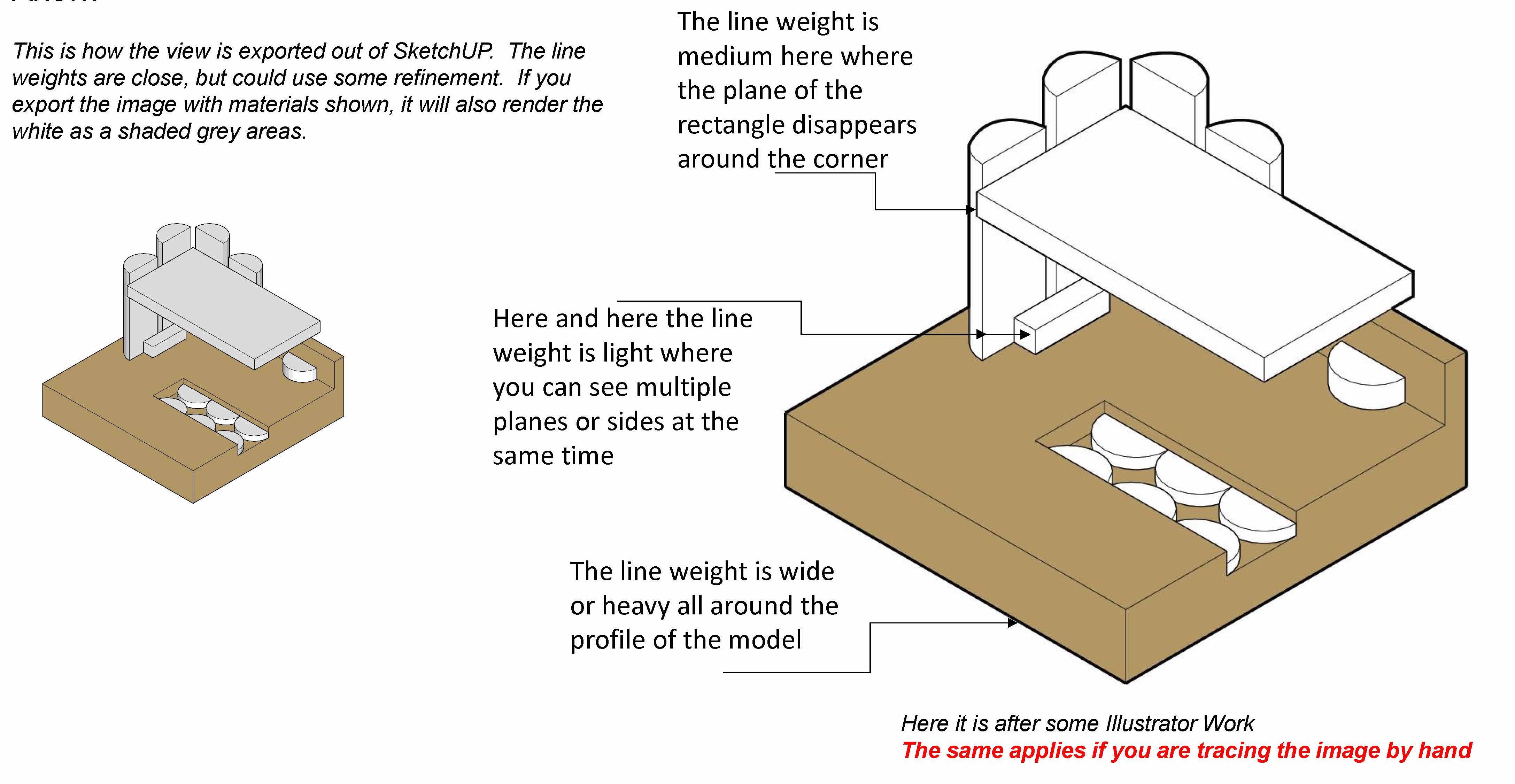
Also refer to the image above
Tasks:
PART 1
- Build your M1 Assignment Model in Sketchup.
- Modify your Sketchup model in Sketchup to reflect your M2 Assignment.
- Consider the M2 Assignment you have completed and the feedback you received. Consider the readings in Chapters 4, 5, and 6. Identify what organizational strategy your model most closely resembles. Summarize this feedback in your sketchbook with pictures and words.
- Begin to develop an improved design incorporating the concepts discussed in the lecture.
- Place a scale figure in your SketchUp model. How does your model work in scale? Is it too big? Is it too small? Can you get into it or is it just a sculpture you can only move around? Begin to use the scale tools to make your model smaller or larger as needed. Consider the feedback you received in M2 and start to find places for a person to interact with the work. Turn shadows on and off to see how your model interacts with light.
- Print out orthogonal views of the top, elevations, and at least two corner perspective views on 8 1/2 x 11 sheets of paper.
- Use trace paper to draw over the printouts of your SketchUp model. Don't just copy what is there. Make modifications based on your reflections on the reading and feedback. Start with modifying the top view and elevations. Consult with your peers and instructor on your direction.
PART 2
- After you have a new plan of action, make changes to your model to strengthen the clarity of your concept. Consider all of the strategies we have covered so far in the course.
- When you have made all changes you think are necessary, create (8) "scenes" for your drawing in SketchUP.
- Scene 1- Birds-eye view of a corner using standard "views. Zoom in and out until you get a good view that fills the page but is not cut off.
- Scene 2 - Eye height view from a corner. You must place the camera and toggle the eye around to get a good view that fills the page but is not cut off.
- Scene 3 & 4- Same as Scene 1 and 2, but turn on the shadows.
- Scene 5 - Approach from eye height
- Scene 6 - Entry from eye height
- Scene 7 - Path from eye height
- Scene 8 - Destination from eye height
- Compose Scenes 5 through 8 onto a single sheet of 8.5 x 11 paper to create the 4 Interior Sequential Scenes with shadows.
- Print scenes 1 through 4 on individual 8 1/2 x 11 sheets of paper. Fill the page as best you can without cutting off parts of your model.
- Print your 4 Interior sequential scenes.
- Cut trace paper to fit nicely over your page and use a variety of pen weights to trace your image. Refer to the resources regarding line weights for 3D images. You may select one of these (2) styles to work in:
- Style A- Use templates to draw straight lines that meet nicely at the corner. Similar to what we have done previously.
- Style B- Freehand the lines using a very slight wiggle and letting lines cross slightly at the corner. You must still use correct line weights.
- Shadows to be colored with B pencil on the backside of the paper
- Scan all (5) of your drawings and turn them in to Canvas as one PDF. Keep your sketches for use later.
Deliverables:
A single 5-page 8.5x11 PDF with the following (submitted digitally as directed in studio):
(5) scanned ink on paper perspective drawings:
- (1) hand traced/drawn 8 1/2" x 11 perspective sketch from a birds-eye view corner of your M3 model (use standard "views", no shadows)
- (1) hand traced/drawn 8 1/2" x 11" perspective sketch from eye height view corner of your M3 model (place a camera, no shadows)
- (1) hand traced/drawn 8 1/2" x 11" perspective sketch from a birds-eye height view corner of your M3 model (place a camera, including shadows)
- (1) hand traced/drawn 8 1/2" x 11" perspective sketch from eye height view corner of your M3 model (place a camera, include shadows)
- (1) set of 4 hand-traced/drawn sequential interior perspective sketches from eye height view, walking us through your model (including shadows).
In Person Presentation:
(1) Digital SketchUp model on your laptop in class
(5) original ink on paper perspective drawings:
- (1) hand-traced/drawn 8 1/2" x 11 perspective sketch from a birds-eye view, corner of your M3 model (use standard "views", no shadows)
- (1) hand-traced/drawn 8 1/2" x 11" perspective sketch from eye height with the corner of your M3 model (place a camera, no shadows)
- (1) hand-traced/drawn 8 1/2" x 11" perspective sketch from a birds-eye height view, the corner of your M3 model (place a camera, include shadows)
- (1) hand-traced/drawn 8 1/2" x 11" perspective sketch from eye height with the corner of your M3 model (place a camera, include shadows)
- (1) A set of 4 hand-traced/drawn sequential interior perspective sketches from eye height view, walking us through your model.
Extra Credit -FOR FUN NOT REQUIRED -Create a SketchUp avatar of yourself and place it in your model and drawings. Here is a YouTube tutorial https://www.youtube.com/watch?v=vz7Mm-YdzmQ
Extra Credit-FOR FUN NOT REQUIRED - 3D print a 4'x4"x4" model in the Stinger Maker Space in the Library
Rubric:
90-100 Significantly above the requirements, work exhibited is of an independent, creative, contributory nature with high level of craft
80-89 Significantly above the satisfactory fulfillment of assignment requirements
70-79 Satisfactory fulfillment of assignment requirements
69-60 Fulfillment of most of the assignment requirements
59-50 Did not fulfill the assignment requirements